Development guides / AI documents and system integration
AI document processing: check the result before creating a record
Decide what a correct result looks like and how to check it. Extracted text may still contain the wrong amount, customer, date or version. Validate and review the result before it enters an operational system.

Why extracted text is not yet a usable record
AI returns a summary, but staff still check for missing attachments, copy fields into a system or prepare a separate review sheet. Start with what the team needs to produce, then decide which steps AI can help with.
Begin with the output format, the person giving final approval and the consequences of errors. Amounts, customer names and dates can be checked against their sources. Make uncertain results visible so someone can resolve them.
What should rules, OCR and AI each do?
Fixed formats and calculations may be handled by ordinary code or existing tools. Consider AI when layouts vary or text needs interpretation. Test clear, blurred, incomplete and differently formatted documents to find where each approach works.
Before testing, confirm whether the chosen services may process the documents, which fields need redaction, who can view them and retention periods. Hosting a workflow on your own server does not by itself prevent external transmission; check each API involved.
Explicit rules
Use ordinary code for fixed fields, required values and defined calculations. Those rules can check AI output too, but a result that passes them still needs to agree with the source.
Text and layout recognition
Check whether a document already contains readable text before adding OCR. Scan quality, table structure, language and missing pages all belong in the test set.
AI for varied wording and formats
Evaluate AI extraction or classification when wording and formats vary. Define output fields, missing-data behaviour and the results that must go to a reviewer.
Design a workflow with source evidence and review
The example below illustrates an approach. It is hypothetical, not a client case study or a claim of delivered results.
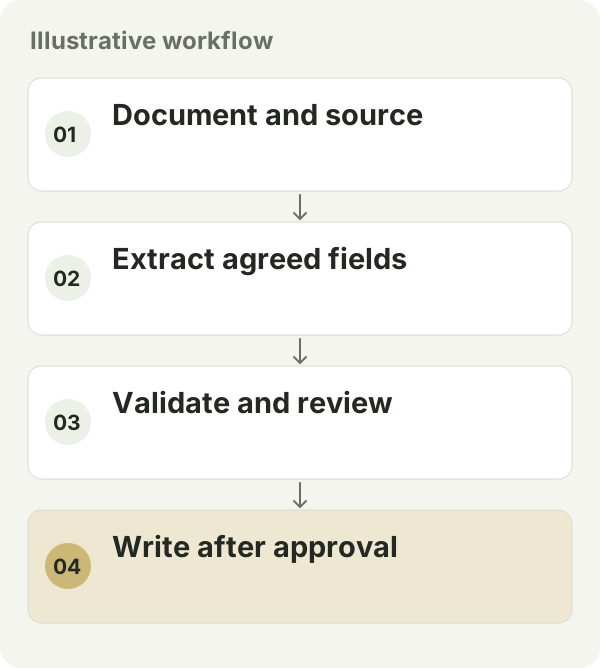
For example, supplier documents could become draft records awaiting approval. Keep the original document and page references, extract the agreed fields and check required values and amounts. Send uncertain or conflicting results to staff. Create the final record after approval and log any corrections.
Three problems a polished demo can hide
A complete answer can contain unsupported fields
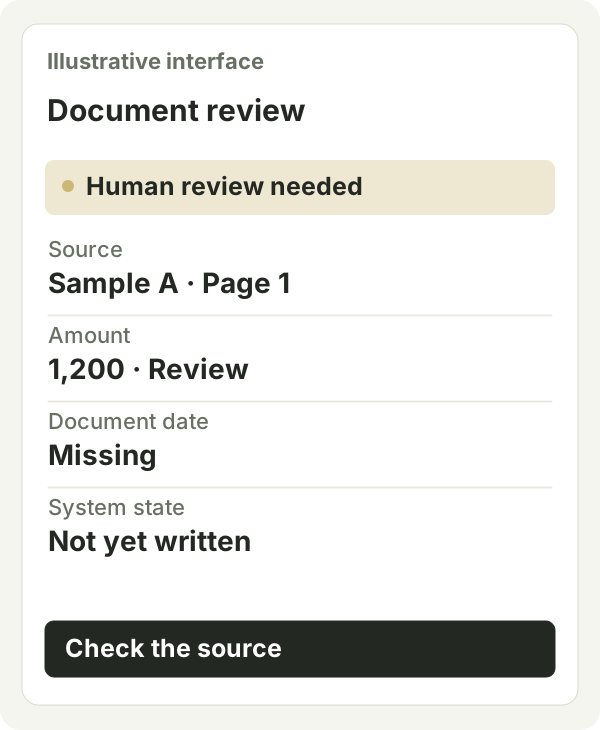
Let staff open the source document and page for each important field. Show the original text, extracted value and any human correction separately. If a date is missing, mark it as missing. Where estimates are allowed, label them and agree how the responsible person will confirm them.
An average can hide errors in critical fields
Check critical fields separately and compare results by document type. Many easy samples can hide problems with a few poor scans. Record what was tested, which values were wrong and which cases were sent for review. Use those details to decide what the workflow can handle.
Fast extraction can still mean slow review
Place the source beside the result and highlight what needs checking. If staff must search files for every field or enter corrections again elsewhere, the process may take as much work as before. Measure the time for finding sources, reviewing and registering records as well as AI processing.
How do you test whether the workflow is useful?
- Prepare expected results checked by a person. Compare each field and record correct, missing and incorrect values separately, with extra checks for fields where errors have serious consequences.
- Test duplicate uploads, service interruptions and human corrections. Verify that records are not duplicated and can be traced to the source document.
- Measure processing cost per document, review time and exception rate. Use the results to decide which document types fit; do not assume a savings percentage.
Compare cost through to completed review
An AI document project can include upload, storage, permissions, source traceability, review and integration as well as extraction or generation. Compare the manual work left across the whole process, rather than only the price of a model call.
Keep some documents out of the tuning process so you can use them for final testing. Test again when document types or models change. If review takes longer, reconsider the supported documents before expanding.
Choose a supported scope before expanding automation
Group trial documents into those the workflow can handle, those needing extra review and those it cannot support. You may begin with a person checking every result. Reduce checks on lower-risk steps only when the results justify it. One tidy template does not show how the system will handle every document.
Keep tracking exceptions by document type. Test new layouts, suppliers and languages. Model and prompt changes need checking too. Retain a fixed sample set and version history so you can spot worse results and hold an update when needed.
Start a testable pilot with these inputs
Prepare samples you are authorised to use, with personal details removed. Bring the target fields, correct results, reviewer and destination system. Start with a limited trial you can check, and include model, API, storage and maintenance charges in the ongoing cost.
Questions before you start
Does document automation always need AI?
No. A readable, consistent format with explicit rules may be enough. Compare actual samples, exceptions and maintenance work before choosing OCR, AI or a combination.
Can a high accuracy claim replace human review?
Check which documents and critical fields the claim covers and how accuracy was calculated. Use your own samples and the consequences of a mistake to decide the review process. A provider’s overall figure cannot replace testing your workflow.